

Amazon Kindle: Reading App 9.14
Kindle for PC was a beloved free app that let you read Amazon eBooks on your Windows computer with syncing, customization, and annotation features. But in June 2026, Amazon discontinued the old app and replaced it with a new Windows 11-only Kindle app that has been widely criticized for lost library access, removed features, and tighter DRM, it currently sits at a 1.7-star rating on the Microsoft Store. The new app makes it harder to access or convert your purchased books, pushing users toward alternatives like Calibre (for library management) or Kindle for Web (for browser-based reading). If you're on Windows 10, you're left without an official Kindle desktop app entirely.
- Free
- Windows
- Nov 10, 2026
9da780315a3e1952184c96e9fe418bab71cf9b663ef05527cbcfbf5b503416f7VirusTotal report ↗Screenshots
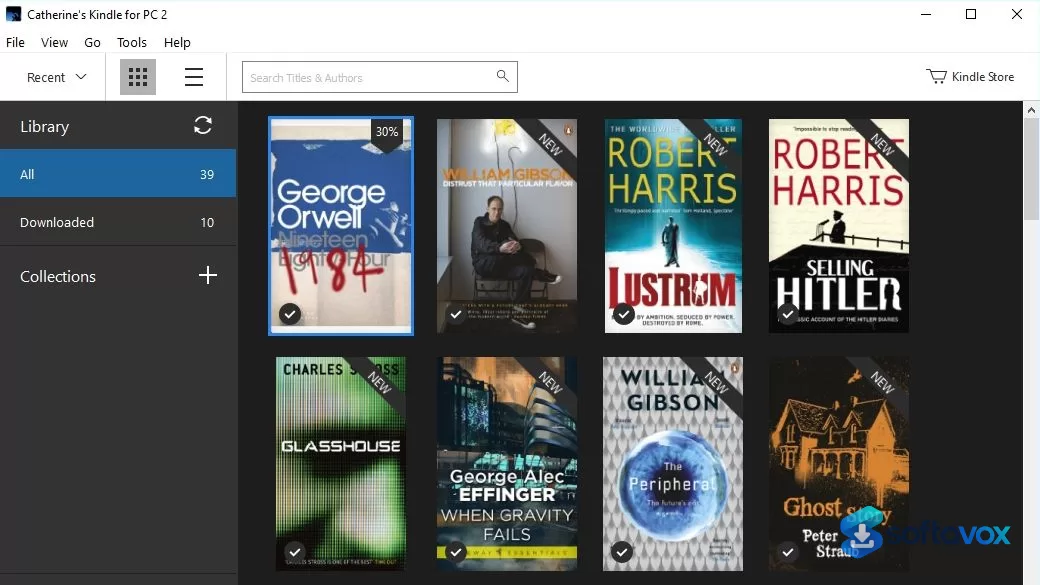
About Amazon Kindle: Reading App
Amazon Kindle: Reading App Download, Read Kindle Books on Windows
TL;DR Quick Take / Who is this for?
Amazon Kindle: Reading App is the replacement for the retired Kindle for PC desktop application, and it is the only official way to read your Kindle library on a Windows computer after June 30, 2026[reference:0]. The app delivers the core reading experience: customizable fonts, margins, and layout, Whispersync across devices, offline downloads, built-in dictionary lookup, and support for comics and manga with Guided View[reference:1]. The trade-offs, however, are severe and well documented. The Microsoft Store rating sits at 1.7 out of 5, and the complaints are not about reading itself but about what was removed: custom storage locations, Kindle Family Sharing, EPUB import, and accessibility features that made the legacy app usable for screen-reader users[reference:2][reference:3][reference:4]. The app also does not run on ARM-based Windows devices, including some Surface tablets, and it forces a fixed cloud-managed storage system that breaks existing downloaded libraries[reference:5][reference:6]. This app is the right pick only if you must read Kindle books on Windows and you are prepared to accept a feature set that is thinner than the application it replaced. For most users, the Kindle Cloud Reader in a browser remains the safer, less frustrating alternative[reference:7].
Quick Info Box
| License Type | Free (requires Amazon account) |
|---|---|
| File Size | Approx. 750 MB |
| OS Compatibility | Windows 10 (build 17763+) and Windows 11; no ARM support |
| Latest Version | 1.0.x (rolls out via Microsoft Store) |
| Developer | Amazon (AMZN Kindle) |
Key Features & Real-World Usability
The new Kindle app delivers the essential reading experience, even if it strips away the flexibility power users relied on. You can adjust font type, text size, page color, margins, text alignment, and layout, including single-column and multi-column views, from the Aa menu inside any book[reference:8][reference:9]. Bookmarks, highlights, and notes sync across devices through Whispersync, and the built-in notebook collects your annotations in one place[reference:10]. The dictionary and Wikipedia lookup work as expected: select a word and the definition appears without leaving the page[reference:11]. Reading progress is tracked with percentage completion and real page numbers for most top titles, and high-definition color images in comics and magazines can be zoomed with panel-by-panel Guided View on supported titles[reference:12]. You can also drag and drop personal documents into the app for reading on the PC or syncing to other Kindle devices[reference:13]. The failures are where the app diverges from what users expected. The storage system is now fixed and cloud-managed, with no option to choose a custom directory; books are stored in a Microsoft Store app-data path that is buried and inaccessible for many backup or management workflows[reference:14][reference:15]. The app does not support EPUB import directly, does not support Kindle Family Sharing, and has limited compatibility with older MOBI files[reference:16][reference:17]. Accessibility is the most serious regression: screen readers can read text only line by line, Say All does not work, Find does not work, and text cannot be selected or copied[reference:18]. The app is also large at around 750 MB, requires a minimum of 2 GB of RAM, and will not install on ARM-based Windows devices such as some Surface models[reference:19][reference:20].
- Customizable reading layout: Adjust font, size, page color, margins, alignment, and column layout to suit your reading preference[reference:21].
- Whispersync across devices: Your last page read, bookmarks, highlights, and notes sync automatically between the Windows app and other Kindle apps and devices[reference:22].
- Built-in dictionary and Wikipedia lookup: Select a word to see its definition or open Google and Wikipedia links without leaving the book[reference:23].
- Comics and manga support: High-definition color images with panel-by-panel Guided View for supported titles[reference:24].
- Offline reading: Download books from your library for reading without an internet connection[reference:25].
- Personal document support: Drag and drop your own files into the app and sync them to other Kindle devices[reference:26].
- Reading progress tracking: See percentage completed and real page numbers for most top titles[reference:27].
Pros, Cons & Community/User Feedback
User sentiment around the new Kindle app is overwhelmingly negative, and the complaints are specific and consistent. The Microsoft Store rating bottomed out at 1.7 out of 5 shortly after launch, with 62 ratings at the time of one review and later settling into a 1.4–2.6 range depending on the region and date[reference:28][reference:29][reference:30]. One reviewer summarised the mood bluntly: "The Microsoft Store is now filled up with mostly terrible reviews of the new app. It has a rating of 1.7 out of 5, and I can find only one positive review"[reference:31]. The most damaging complaint is the storage change. Users who had downloaded books to a custom folder found that the new app stores content in a Microsoft Store app-data directory and cannot read the old library, which means previously downloaded books appear to be missing or unreadable[reference:32]. A long-term user who contacted Amazon support received confirmation that the new app "uses a fixed storage system that doesn't allow custom directory selection like the legacy version did" and that books are "managed through the cloud synchronization system"[reference:33]. The second major complaint is missing features. Kindle Family Sharing is gone, EPUB import is no longer supported directly, MOBI support is limited, and the feedback option inside the app has been removed[reference:34][reference:35]. Accessibility regressions are the third and most serious issue for affected users. A screen-reader user who tested the app with NVDA and JAWS reported that text can be read "only line by line," that "Say all does not work," that "Find does not work," that "you cannot select or copy text," and that the app is "effectively unusable for long-form reading, or for research and study"[reference:36]. The app also does not run on ARM-based Windows devices, which locks out owners of some Surface tablets and other ARM laptops[reference:37][reference:38]. The positive feedback that exists is limited but real: some users say the new app is "faster and the interface is cleaner" than the legacy version, and the core reading layout controls are functional and easy to find[reference:39]. The practical takeaway is that the new Kindle app works for casual reading on a compatible Windows PC, but it is a thinner, less flexible, and less accessible application than the one it replaced, and the forced migration has left many long-time users frustrated.
Pros
- Free and available directly through the Microsoft Store
- Customizable font, layout, margins, and page color for comfortable reading
- Whispersync keeps bookmarks, highlights, and reading position synced across devices
- Built-in dictionary and Wikipedia lookup while reading
- Comics and manga support with Guided View
- Offline reading after downloading books from your library
- Some users report the interface is cleaner and faster than the legacy app[reference:40]
Cons
- Microsoft Store rating of 1.7/5, with the vast majority of reviews at one star[reference:41][reference:42]
- Fixed cloud-managed storage with no custom folder option; existing downloaded libraries may not be recognized[reference:43][reference:44]
- Missing features: Kindle Family Sharing, EPUB import, and full MOBI support[reference:45][reference:46]
- Severe accessibility regressions: screen readers work line by line only, Say All and Find do not work, and text cannot be selected or copied[reference:47]
- Does not run on ARM-based Windows devices, including some Surface models[reference:48]
- Large install size (around 750 MB) for a reading app[reference:49]
- No in-app feedback option; users must go through Amazon customer service to report issues[reference:50]
- Requires Windows 10 build 17763 or later; older Windows 10 builds and some older hardware are excluded[reference:51]
Final Verdict & Safe Download Advice
Amazon Kindle: Reading App is a forced migration, not a welcome upgrade. It does the basic job of displaying Kindle books on a Windows screen, and the reading customization and Whispersync features work as advertised. But it removes more than it adds. Custom storage is gone, Family Sharing is gone, EPUB import is gone, accessibility for screen-reader users has regressed badly, and the app will not run on ARM-based Windows hardware. The 1.7-star rating is not a review-bombing campaign; it is a accurate reflection of how existing users experienced the transition from a flexible desktop application to a locked-down Microsoft Store app. If you have no choice but to read Kindle books on Windows, install the app and use it for casual reading, but keep your expectations low and do not rely on it for research, annotation-heavy work, or accessibility-dependent workflows. For everyone else, the Kindle Cloud Reader in a browser is the better path: it avoids the installer, the storage headaches, and the missing features, and it works on any device with a modern browser[reference:52]. If you are on Windows 10, you can also continue using the legacy Kindle for PC app for now, but it will stop working after June 30, 2026, so plan your transition accordingly[reference:53].
- Download only from the official Microsoft Store listing: The legitimate app is published by "AMZN Kindle" on the Microsoft Store at the URL in this review. Search results sometimes surface paid look-alike apps with similar names, so verify the publisher before clicking Install[reference:54].
- Check your Windows version and architecture before installing: The app requires Windows 10 build 17763 or later, and it does not support ARM-based Windows devices. If you are on an ARM Surface or similar device, the app will not install, and the Cloud Reader is your only option[reference:55][reference:56].
- Expect a large download and a cloud-managed library: The app is approximately 750 MB and stores books in a fixed Microsoft Store app-data folder that you cannot change. If you need local file access for backup or DRM management, this app does not provide it[reference:57][reference:58].
- Test accessibility before relying on it: If you use a screen reader, test the app with your specific reader before depending on it for reading or study. The reported limitations (line-by-line reading only, no Say All, no Find, no text selection) are severe enough to make the app unsuitable for many accessibility workflows[reference:59].
- Keep the Cloud Reader as a fallback: The browser-based Kindle Cloud Reader provides access to most of your library without the installer, the storage restrictions, or the ARM incompatibility. For occasional reading or when the app fails, it is the most reliable alternative[reference:60].
- Do not download "cracked" or "modded" Kindle apps: The app is free and tied to your Amazon account. Modified installers are a malware vector, and they violate Amazon's terms of service. The official Microsoft Store listing is the only safe source.
Similar software



Key features
- Free reading app, available via Microsoft Store; requires Amazon account
- Customizable reading layout, adjust font, size, page colour, margins, alignment, and column layout
- Whispersync across devices, syncs last page read, bookmarks, highlights, and notes
- Built-in dictionary and Wikipedia lookup, select a word for definitions without leaving the page
- Comics and manga support, HD colour images with panel-by-panel Guided View
- Offline reading, download books from your library for offline access
- Personal document support, drag and drop your own files and sync to other Kindle devices
- Reading progress tracking, percentage completion and real page numbers for most top titles
- Cleaner, faster interface, some users report improvement over the legacy app
Frequently asked questions about Amazon Kindle: Reading App
Is Kindle for PC still available?
Does the new Kindle app work on Windows 10?
Can I read my old Kindle books in the new app?
Is the new Kindle app free?
Why can't Calibre open my Kindle books anymore?
What can I use instead of the Kindle app on Windows?
Versions
| Version | Release date | Platform | File size | |
|---|---|---|---|---|
| Amazon Kindle: Reading App 9.14 Latest version | Jun 2, 2026 | Windows | 794 KB | Download |
Comments about Amazon Kindle: Reading App
No comments yet. Share your experience with this program!